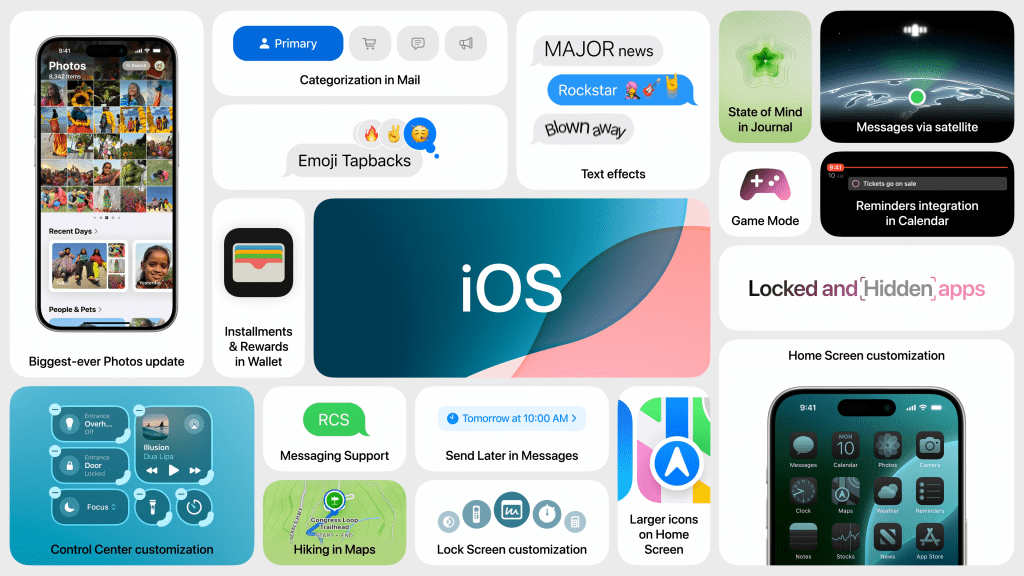
Apple just announced a slew of new updates to their major operating systems at WWDC last week. I will break down some of the features and announcements that I am the most excited for with arguable Apple’s most important operating system, iOS.
Apple introduced the latest software for the iPhone called iOS 18. This is one of the most significant updates since the iPhone was launched. Although there is not major design overhauls across the system, there are some meaningful updates that I am excited to try out and use.
There is a significant update to the homescreen. Users can now personalize the home screen layout more freely by placing them anywhere on the screen. There is still an invisible grid for the layout so there is still some uniformity. This has been a feature on Android devices for quite some time and I am happy Apple has incorporated this feature, maybe to lure over Android users? Anyway, it does make the iPhone home screen more custom to you. Additionally, the app icons are now tinted in dark mode. You can also tint every app icon a single color as well. I know many people download third-party applications for changing the tint and appearance of the app icons. I am excited Apple has brought this in-house for those people that decide to change the looks of their apps, although I am not one of those people.
Another customization feature available with iOS 18 is the ability to fully customize the control center. This has been a highly requested feature for a while and I am excited that it finally has arrived. You can resize different controls, change the layout and there are now new pages for organizing the daily controls, music player, home controls and more. You can also swap out the controls on the lock screen (the default camera and flashlight buttons that are there now) to Apple apps as well as third-party apps. You can even use the Action button on iPhone 15 Pro to access these new controls. I will definitely be using these new customization features myself. I have been waiting to change the buttons on the lock screen for a while and I am glad Apple finally added that ability. I did not understand previously why Apple had one of the default buttons there be one for the camera while swiping from the right side of the lock screen reveals the camera. Huh. I am glad they addressed this.
With iOS 18, there is a complete redesign of the Photos app. It now boasts a cleaner, simpler design with a more intuitive layout for everything important. There are not different menu buttons at the bottom of the app for Library, For You, Albums and Search. It is now one singular page that house the previous Library tab called the grid. Scrolling below it reveals a page that housing basically a merger of the For You and Albums tabs. If you swipe to the right or left of the Photo grid, it will reveal a rotating carousel of sorts, showcasing different albums and photos throughout different times. The search is now centrally located at the top of the app for easy access and has richer results with recognition from photos and even videos. I personally like that Apple is continually evolving its core apps, but I do not think this was generally necessary. I thought the Photos app already was easy enough to use but I feel like it is just the way apps evolve and another feature to be excited for.
Apple also brings some updates to Messages with iOS 18. You can FINALLY use bold, italics, underline and strikethrough while typing. WOO-HOO! I am definitely excited for this. I was stumped why Apple did not have these basic features while most of the native apps like Notes and Pages supported this while one of their most popular apps did not. Additionally, other text effects coming with iOS 18 including ways to apply animated effects to any letter, word, phrase, or emoji. Some of these include Shake, Explode, Ripple, Boom and others. Tapbacks also get an update with a refreshed design consisting of an emoji like appearance. You can also react to any text with any emoji now, as you are not just limited to the set reactions Apple previously had. Another new feature to Messages is you can now schedule a text to be sent later. I think this is very useful for special occasions that you do not want to forget, like scheduling a text for the next day for someone’s birthday. I will be using this feature often. Messages now supports RCS (Rich Communication System), a modern standard for more dynamic and secure messaging compared to SMS or MMS. Previously, texting Android users was limited to SMS or MMS, causing issues in group chats and lacking features of iPhone-to-iPhone texts. With RCS, Android texts function more like iPhone texts, though they still appear as green bubbles, which helps distinguish between iPhone and Android messages. I am very excited about all of these features as it is one my most used native Apple apps. It makes it more fun to use as well as adding some important general features.
Mail gains important updates with iOS 18. There are new sorting categories like Primary (most essential emails), Transactions (receipts and other confirmations), Promotions (marketing and sales messages) and Updates (newsletters and everything else). The messages app overall has a fresh look with contact photos on individual emails and more clearer buttons and labels. I created a rendering of what an all-new Mail app would look like about a year ago with contact images and more and sent it to one of my Apple friends. It actually looks surprisingly quite similar to the rendering that I put together. How funny!
Other updates across the system include Safari’s Highlights and a smarter Reader, a Passwords app for secure credential storage, topographic maps in Maps, Game Mode for enhanced gaming performance, and Wallet’s Tap to Cash and new event tickets. AirPods gain hands-free Siri with nodding for accepting requests, voice isolation, and personalized audio. Notes support live transcription and collapsible sections, while the Journal app tracks well-being. The Apple TV app offers detailed content insights, and the Home app adds guest access controls and hands-free unlocking. Enhanced privacy settings, Eye Tracking, and Music Haptics improve accessibility, and the Phone app now includes call recording and transcription.
Overall, iOS 18 brings significant enhancements that increase customization, improve core apps like Photos and Messages, and introduce new features such as a redesigned control center and a dedicated Passwords app. These updates make the iPhone more versatile and user-friendly, continuing to evolve the iOS experience.
 The Apple Enthusiast