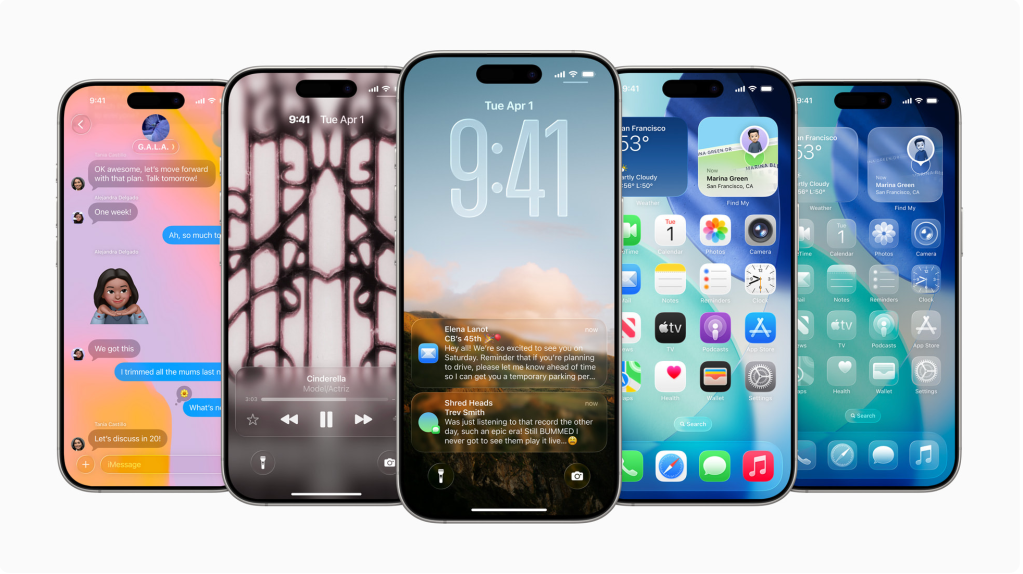
iOS 26 is here, and it is the biggest overhaul of the iPhone software since iOS 7. Not only does this software release provide a fresh new design, but it paves the way for the future of Apple’s design language. Please refer back to my previous post on a broader description of Apple’s WWDC25 and new software naming scheme.
To start, the biggest change that you can see is the addition of Liquid Glass throughout Apple’s software. The new look brings a layered, soft translucency to everything, from the Control Center to notifications to app interfaces. It feels like the UI elements are floating, with blurred glass panels and gentle lighting that shifts with motion and angle. It’s still unmistakably Apple, but it feels more fluid and elegant. It doesn’t scream change, but you immediately feel the new, modern aesthetic throughout every native Apple app and other device experiences. I really like this new design direction, bold enough to feel new, subtle enough to feel familiar. Here’s the intro Apple’s has show to Liquid Glass and several images:
With this release, Apple also has brought multiple new features powered by Apple Intelligence. Apple Intelligence features like Personal Context, on-screen awareness, and deep in-app control were all announced last year but haven’t been released yet. They are now officially planned for 2026 as Apple continues to refine them. Beyond the previously announced capabilities of Apple Intelligence, there are several new ones with iOS 26. Live Translation is spread throughout the software, with real-time language translation making communication smoother than ever in apps like Messages, FaceTime, and Phone. Visual Intelligence makes its way to on-screen objects, simply by taking a screenshot. You can circle a portion of the screen and Apple Intelligence will find the object through Google or ChatGPT and find ways to purchase, including through apps installed on-device like Etsy and Ebay. And, through just the screenshot, you can set an event through calendar by the help of Apple Intelligence. Another feature debuting this year is the ability to make Genmoji through combining two emojis in addition to describing through text. All these capabilities are embedded throughout the system to boost communication and productivity while maintaining Apple’s strong focus on privacy, with processing done on-device whenever possible.
There are also several impactful updates to Messages and Phone that Apple highlighted at WWDC25. The Phone app now features a unified layout that makes it easier to manage calls, along with new tools like Call Screening and Hold Assist to help filter unwanted calls and reduce interruptions. Messages gets a big boost with message screening to better manage spam and unknown senders, customizable chat backgrounds for a more personal touch, and even built-in polls for quick group decision-making in group chats. And, there are now typing indicators along with Apple Cash abilities for group chats. These improvements make everyday communication smoother and more enjoyable, showing Apple’s continued focus on practical, user-centered enhancements.
One of the biggest redesigns this year is of the Camera app. The Camera app in iOS 26 has been thoughtfully redesigned to make capturing photos and videos faster and more intuitive. Apple simplified the interface so switching between modes feels seamless, letting you focus more on the moment and less on fiddling with controls. Meanwhile, the Photos app has also been refreshed, having the Library and Collections tabs returning after a short hiatus from last year.
There is also a brand new app, called Games. It organizes all your games in one centralized location, making it easier to find, launch, and manage your gaming experience. The app supports cross-device play, so you can start a game on your iPhone and pick it up on your iPad or Mac seamlessly. It also features personalized recommendations and curated collections to help you discover new titles. With this, Apple is clearly aiming to make gaming a more integral part of the iOS ecosystem, appealing to both casual players and dedicated gamers alike.
There are also several updates to core apps and experiences of iOS like upgrades to the Lock Screen, refreshes to Safari, Apple Music, Wallet, and Maps. On the Lock Screen, the Liquid Glass time expands and shrinks to fit behind the subject of a wallpaper. Also on the Lock Screen is a new spatial scene option for photo wallpapers, giving them a 3D look and a sense of movement. And, when you are playing music from Apple Music, the animated album art now takes up the full screen, showing a more immersive experience. In Safari, there is a whole new look, with a more rounded Liquid Glass buttons and adds a floating tab bar at the bottom of the app, but there’s an option to bring the old, more detailed tab bar back if you prefer a more feature rich menu. In Apple Music, there’s a Lyrics Translation feature that translates lyrics that aren’t in your language, and Lyrics Pronunciation helps you pronounce those lyrics. A new AutoMix feature uses intelligence to transition from one song to another, using time stretching and beat matching for a seamless shift between songs. Also, there is the ability to pin certain albums or artists to the top of the Library page for quick access to oft-used favorites.
With Wallet, there’s a new Apple Intelligence feature that can scan your emails to summarize order tracking details from merchants, even if you didn’t make the purchase with Apple Pay. It lets you see all your purchases and their tracking info in one spot. Wallet also now supports paying with installments in stores and getting rewards on in-store purchases. Boarding passes in Wallet support Live Activities for real-time flight tracking, and include access to Maps and Find My. CarPlay is getting the same Liquid Glass design overhaul, along with widgets and Live Activities that sync from the iPhone. There are quick access Tapback options, important conversations can be pinned, and Apple added a new compact view for incoming calls so directions aren’t blocked.
Overall, iOS 26 brings a clear sense of direction to the future of Apple’s software. It is not just about adding flashy new tools. It is about tightening the experience, deepening intelligence, and giving the entire system a modern, more polished feel. The introduction of Liquid Glass gives the interface a fresh visual identity, while Apple Intelligence quietly powers smarter, more personal interactions in this latest software. Updates to core apps and new additions like the Games app help round things out, showing that Apple is thinking about every corner of the user experience. Altogether, iOS 26 feels focused, forward-looking, and more cohesive than ever.
Check out more here from Apple and other sites that cover Apple:
Apple elevates the iPhone experience with iOS 26 | Apple Newsroom
Apple unveils iOS 26 with Liquid Glass redesign, CarPlay updates, Games app, much more | 9to5mac
Here’s a video from Apple, recapping many of the announcements connecting to iOS 26:
 The Apple Enthusiast