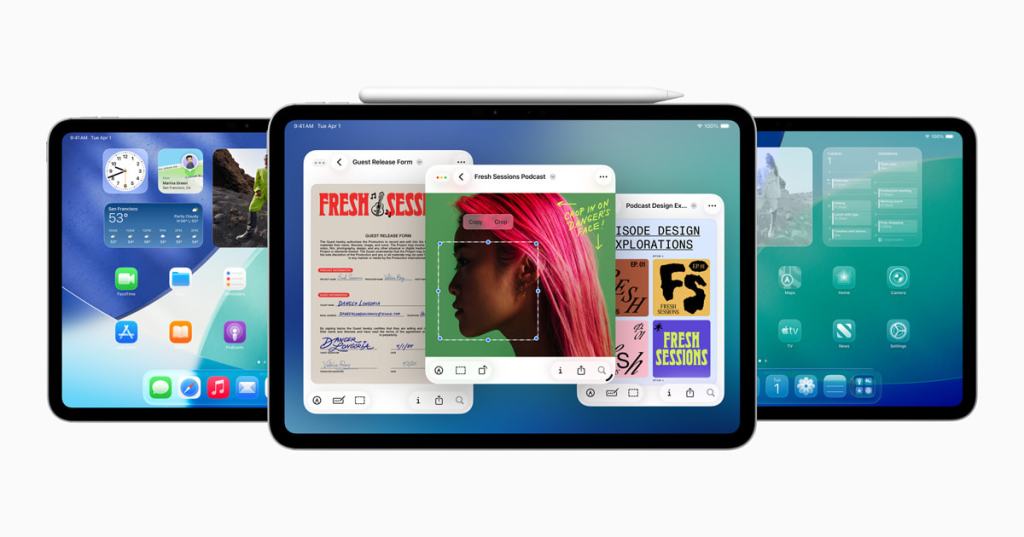
Since as long as I can remember, the iPadOS software updates have been smaller, and more incremental than a drastic change from the previous release. Now, Apple is changing that narrative with iPadOS 26, bringing the biggest update to iPad ever.
The iPadOS 26 release also carries over many of the features of iOS 26 like the new Liquid Glass design, Apple Intelligence features such as Genmoji and Live Translation, and updates to core apps like Messages, Safari, and Music. But, there are many features that are exclusive to iPad that change the whole experience.
To start off, iPadOS 26 brings a completely reimagined way to multitask, with movable, resizable windows and a new Exposé-style view to manage open apps more intuitively. It drops the old Split View and Slide Over methods in favor of a new experience that’s smoother and more flexible, making the iPad more Mac-like and window controls in the top left of the app like Mac available for full-screen, minimize, and close the app.
And, now the iPad has a menu bar at the top of the screen, revealed with a simple swipe down from the top. It is familiar, with app controls and different menus for different tools while in an app.
iPadOS 26 also introduces powerful new ways to manage, access, and edit files with a significantly enhanced Files app. The updated List view offers resizable columns and collapsible folders, allowing users to see more document details at a glance and organize their workspace to their liking. Folder customization now lets users add colors, icons, and even emoji to folders, making it easier to identify them quickly and are synced seamlessly across all devices. For faster workflow, you can drag any folder from Files directly into the Dock for immediate access from anywhere in the system.
A brand-new Preview app debuts on iPad, bringing a dedicated space for viewing, editing, and marking up PDFs and images. It supports Apple Pencil and touch input, enabling users to sketch, annotate, and fill out forms with ease using AutoFill, similar to that of Mac. The app integrates tightly with the Files app, so all your documents and images are just a tap away. Whether you’re signing contracts, drawing quick sketches, or filling in paperwork, Preview adds pro-level usability directly into the iPad experience without needing to switch devices or apps.
Taking advantage of Apple Silicon’s power, iPadOS 26 unlocks Background Tasks, allowing apps to perform intensive processes even after they’re closed. Users get clear visibility and control over these tasks through Live Activities, ensuring they know exactly what is running and can manage it easily.
On the audio front, iPadOS 26 brings more flexible input options and improved recording quality. Users can select different microphones per app or website, and Voice Isolation technology reduces ambient noise for crystal-clear recordings. For owners of the latest AirPods models, studio-quality audio recording is now possible, making the iPad an even better tool for musicians, podcasters, and content creators. Local capture enhances video conferencing by letting users record high-quality audio and video directly from calls, complete with echo cancellation to keep their voice clear.
Overall, this latest iPad software update drastically changes the experience of iPad. It has been maximized to act more like a Mac, blurring the lines in functionality between the iPad and Mac. At the same time, it maintains the fluid and intuitive interface that users expect from iPadOS. With enhanced multitasking, powerful updates to apps, and intelligent features designed to boost the user experience, iPadOS 26 sets a bold new standard for what the iPad can achieve.
Check out this video about iPadOS 26 here:
And, here’s Apple’s press release describing iPadOS 26:
 The Apple Enthusiast